







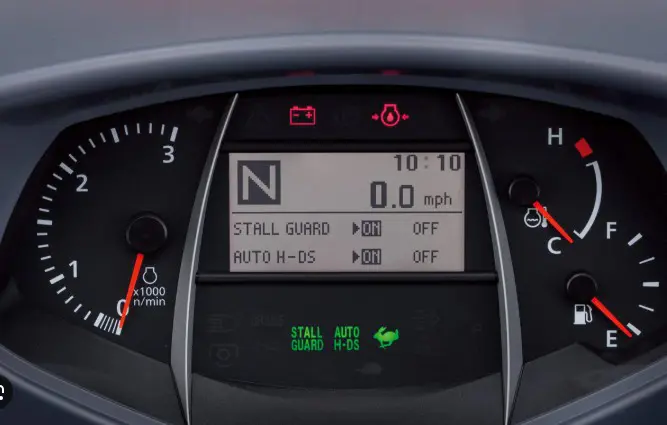
Kubota Grand L60 Diagnostic mode.
Tags : kubota |Kubota IntelliPanel Diagnostic Functions
Understanding IntelliPanel Diagnostic Modes on Kubota Grand L60 Tractors
Kubota Grand L60 tractors use the IntelliPanel not only as a dashboard display, but also as a built-in diagnostic and calibration tool. By entering the panel’s service mode, technicians can access lettered menu functions that check sensors, calibrate speed and PTO readings, reset stored errors, and fine-tune GST or HST transmission controls.
These modes are especially important after replacing an IntelliPanel, ECU, transmission sensor, throttle sensor, or related control component. Some modes are simple setup functions, while others store critical calibration values used by the tractor’s electronic control system. Knowing what each mode does helps separate basic display setup from functions that directly affect drivability, shifting quality, and tractor operation.
How to Enter IntelliPanel Diagnostic Mode
- Turn the tractor key switch to the OFF position.
- Press and hold the Display Mode switch on the IntelliPanel.
- While holding the Display Mode switch, turn the key switch to ON.
- The IntelliPanel will enter the mode selection screen.
- Press the Display Mode switch to scroll through the available lettered modes.
- Hold the Display Mode switch for about 2 seconds to select the desired mode.
| Mode | Function | Explanation |
|---|---|---|
| A | Live diagnostics / sensor monitoring | Displays live sensor voltages, RPM readings, temperatures, and ECU inputs so technicians can troubleshoot electrical and sensor problems. |
| B | Tire / speed calibration | Calibrates the speedometer and ground-speed calculations for tire size changes or IntelliPanel replacement. |
| C | PTO speed calibration | Calibrates PTO RPM display accuracy and PTO coefficient data stored in the IntelliPanel. |
| D | Clear stored errors | Deletes stored fault or error history from the IntelliPanel and ECU system after repairs or troubleshooting. |
| E | GST neutral sensor calibration | Teaches the ECU the exact neutral position of the GST shift lever sensor so GST shifting logic works correctly. |
| F | GST valve calibration | Calibrates the GST proportional reducing valve so clutch engagement and shifting pressure are controlled properly. |
| G | GST shift shock tuning | Fine-tunes GST clutch engagement timing to soften or improve harsh shifting feel. |
| H | Unused / reserved | No documented function in the Grand L60 workshop manual. Likely reserved for factory or future use. |
| I | Unused / reserved | No documented function in the Grand L60 workshop manual. Likely reserved for factory or future use. |
| J | MPH / KPH unit setup | Sets the displayed travel-speed units in the IntelliPanel. |
| K | HST pedal and swash plate calibration | Calibrates HST pedal position, swash plate position, and range lever sensors so HST drive operation works correctly. |
| L | Throttle sensor calibration | Teaches the ECU the idle and full-throttle positions of the hand throttle sensor. |
| M | Unused / reserved | No documented function in the Grand L60 workshop manual. |
| N | Tractor model initialization | Loads tractor model information into the ECU after ECU or IntelliPanel replacement. Required before Mode K and Mode L on HST tractors. |
Final Notes on Kubota IntelliPanel Diagnostic Modes
The IntelliPanel system on Kubota Grand L60 tractors is much more than a digital dash display. These built-in service modes allow technicians to troubleshoot electrical issues, calibrate transmission and throttle sensors, configure speed and PTO settings, and store critical operating values inside the tractor’s ECU.
While some modes are straightforward, others directly affect tractor drivability, shifting performance, and transmission operation. Incorrect calibration procedures can lead to poor shifting quality, warning codes, improper operation, or even a tractor that will not move or start correctly. For that reason, Kubota service procedures should always be followed carefully whenever performing IntelliPanel adjustments.
Need the Complete Service Procedures?
This article provides a general overview of the IntelliPanel diagnostic functions, but the factory Kubota workshop manual contains the complete step-by-step adjustment procedures, calibration sequences, specifications, error-code explanations, and troubleshooting information for each mode.
Contact Messick's Parts or Service Department to purchase the full Kubota workshop manual for your specific tractor model and serial number.


More Articles

Review of the new Kubota SSV65 Skid Loaders
Here with the very first of our Kubota SSV skid steers. We're really excited to show these to you here today. This is probably for us one of the biggest Kubota product launches we have ever had. The demand and excitement among our customers and our staff here is probably a new record among products that we've had through here before.

Overview of the Kubota ZD1211 Zero Turn Mower